
AI tools for LinkedIn content creation: an honest comparison

You use ChatGPT to draft LinkedIn posts. You copy them into Buffer to schedule them.
You still wonder why you can’t post consistently. The problem isn’t your discipline. It’s the operational overhead of your workflow.
41% of LinkedIn users are using AI tools like ChatGPT to create content. But most still struggle to post consistently. The issue isn’t the AI itself. It’s the friction between tools.
Here’s the reality: you’re managing three separate systems. ChatGPT for drafting. A scheduler for publishing. Your brain for everything in between. Every post requires copying, pasting, formatting, and context-switching. That overhead kills momentum.
Understanding AI tools for LinkedIn content creation means comparing not just features but operational sustainability. Which workflow can you actually maintain for six months?
The fragmented workflow problem
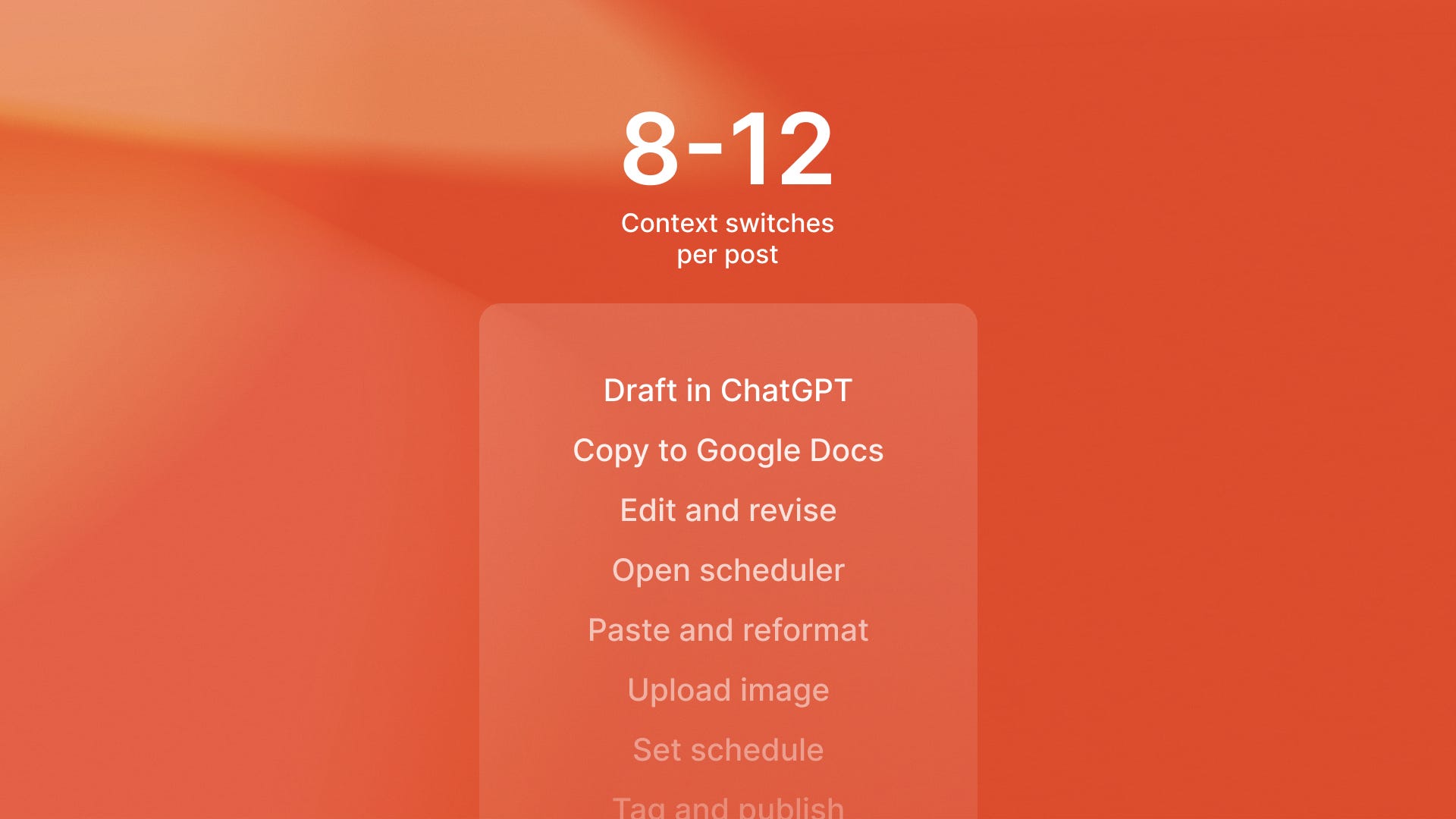
Most LinkedIn creators use a workflow like this. They open ChatGPT and describe what they want to write. They copy the output and paste it into Google Docs. They edit it for voice and accuracy. They copy it again and paste it into Buffer or Hootsuite. They format it for LinkedIn’s character limits. They schedule the post and hope it publishes correctly.
That’s 8-12 context switches per post. Each switch carries mental load. Each step is a place where the process can break down.
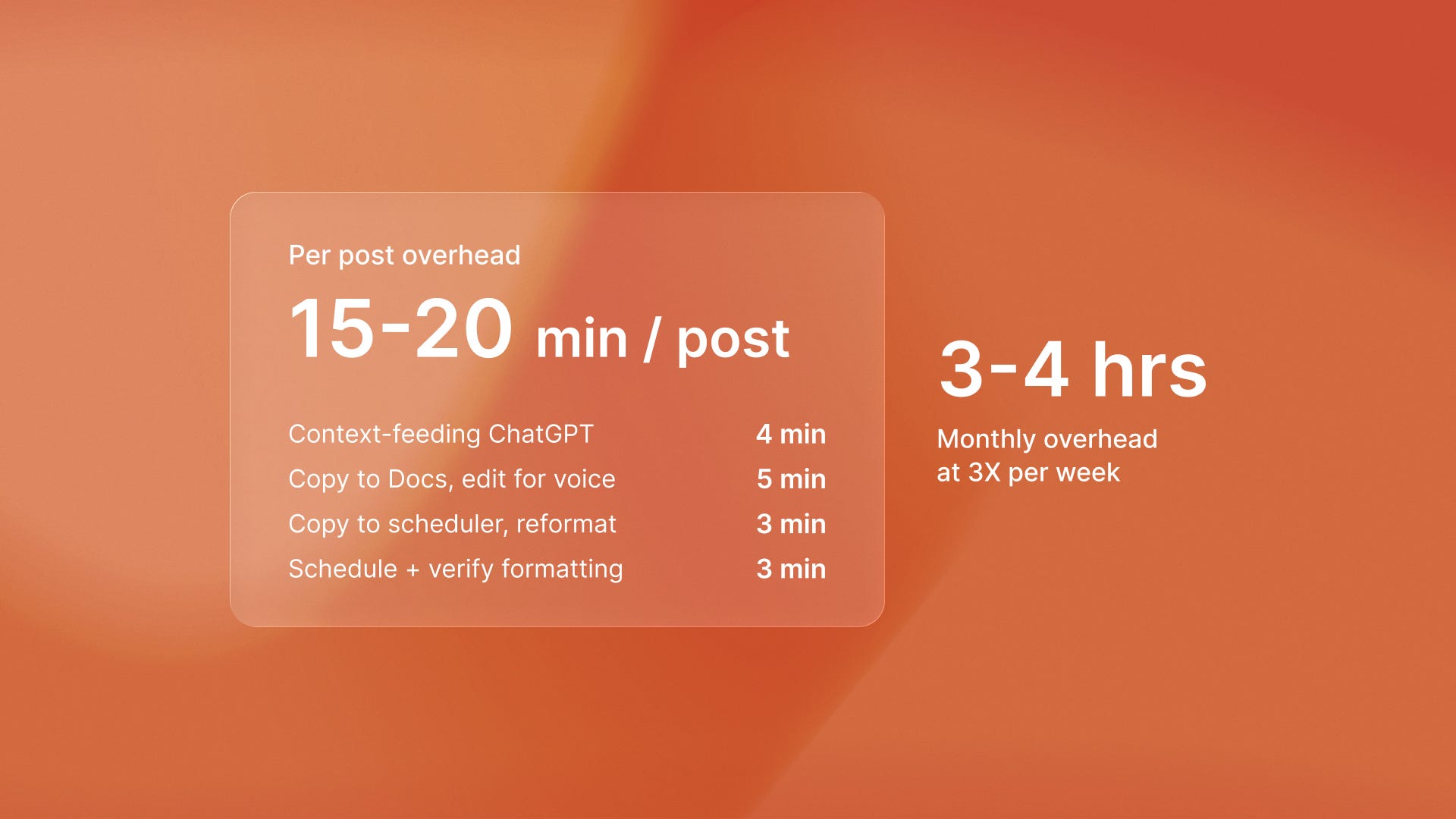
The cost adds up. If you’re posting three times per week, you’re doing this 12 times monthly. At 15-20 minutes per post, that’s 3-4 hours of copying and pasting. Not writing. Not strategizing. Just moving text between systems.
Fragmented tools across drafting, editing, and scheduling create unsustainable friction that prevents consistent LinkedIn publishing. The core problem is simple: tools that don’t talk to each other create manual bridges you have to maintain forever.
ChatGPT + scheduler workflows: when manual work makes sense
ChatGPT is the default starting point for most AI-assisted content creation. It’s accessible, powerful, and widely understood. For occasional LinkedIn posters, this workflow can work.
Here’s when it makes sense:
You’re posting once or twice per week
You have time to manually feed context into each prompt
You’re comfortable editing AI output to match your voice
The upfront cost is low (ChatGPT is $20/month, Buffer starts free)
But there are limits. ChatGPT for LinkedIn posts requires manual context-feeding that never goes away. Every post requires you to manually describe your product, reference recent analytics, or pull insights from your CRM. You’re the integration layer. That context-feeding work compounds over time.
The quality ceiling is real. Generic AI outputs sound generic because the AI doesn’t know your business. It can’t reference last quarter’s customer feedback or tie content to product launches. You can train it with custom instructions, but those degrade as your business changes.
AI-powered search engines now drive 527% more traffic than traditional SEO. This makes content quality and consistency more important than ever. Generic outputs won’t build the citation-worthy authority AI engines prioritize.
Generic social media schedulers: the multi-platform trade-off
Buffer, Hootsuite, and similar schedulers solve the publishing problem. They handle timing, cross-posting, and basic analytics. For teams managing LinkedIn alongside Twitter, Instagram, and Facebook, they create operational efficiency.
The value is consolidation. One dashboard, multiple platforms. Post once, publish everywhere. For social media managers running campaigns across channels, this matters.
But generic schedulers treat LinkedIn like every other platform. They miss LinkedIn-specific mechanics:
The 90-minute velocity window where early engagement determines reach
The importance of pre-posting warm-up through DMs and comments
The algorithmic weight of first-degree connections engaging within minutes of publishing
Personalization is limited. Best LinkedIn automation tools should connect to your business data. But schedulers can’t access your CRM. They can’t reference customer conversations or pull product data. This data helps inform your content. They schedule what you give them. You’re still manually creating the content, still feeding context, still doing the creative work.
The tool comparison between assistants and agents applies here. Marketing agencies choosing between tools that enhance workflows versus replace them face a similar choice. They must pick between small efficiency gains and workflow changes. These changes can deliver 64% productivity improvements.
AI-native LinkedIn platforms: integrated personalization
AI-native LinkedIn platforms take a different architectural approach. They connect to your business tools to create LinkedIn content creation software that generates posts automatically. They pull data from analytics, CRM, and product systems to create personalized posts without manual context-feeding.
ReachSocial exemplifies this architecture. It connects to your business data sources and generates LinkedIn content that reflects real insights. A product launch in your roadmap becomes post angles. Customer feedback from your support system becomes social proof. Analytics trends become content hooks.
The operational difference is elimination of copy-paste friction. No ChatGPT tab, no Google Docs intermediary, no Buffer scheduling screen. Content generation, editing, and publishing happen in one workflow. The platform eliminates the 12-18 context switches per post that waste 15+ hours monthly when using fragmented tool combinations.
Personalization quality improves because the AI has context. When AI-assisted outreach doubles response rates from 5.1% to 10.3%, it’s because the personalization is real. The AI references actual business data, not generic templates.
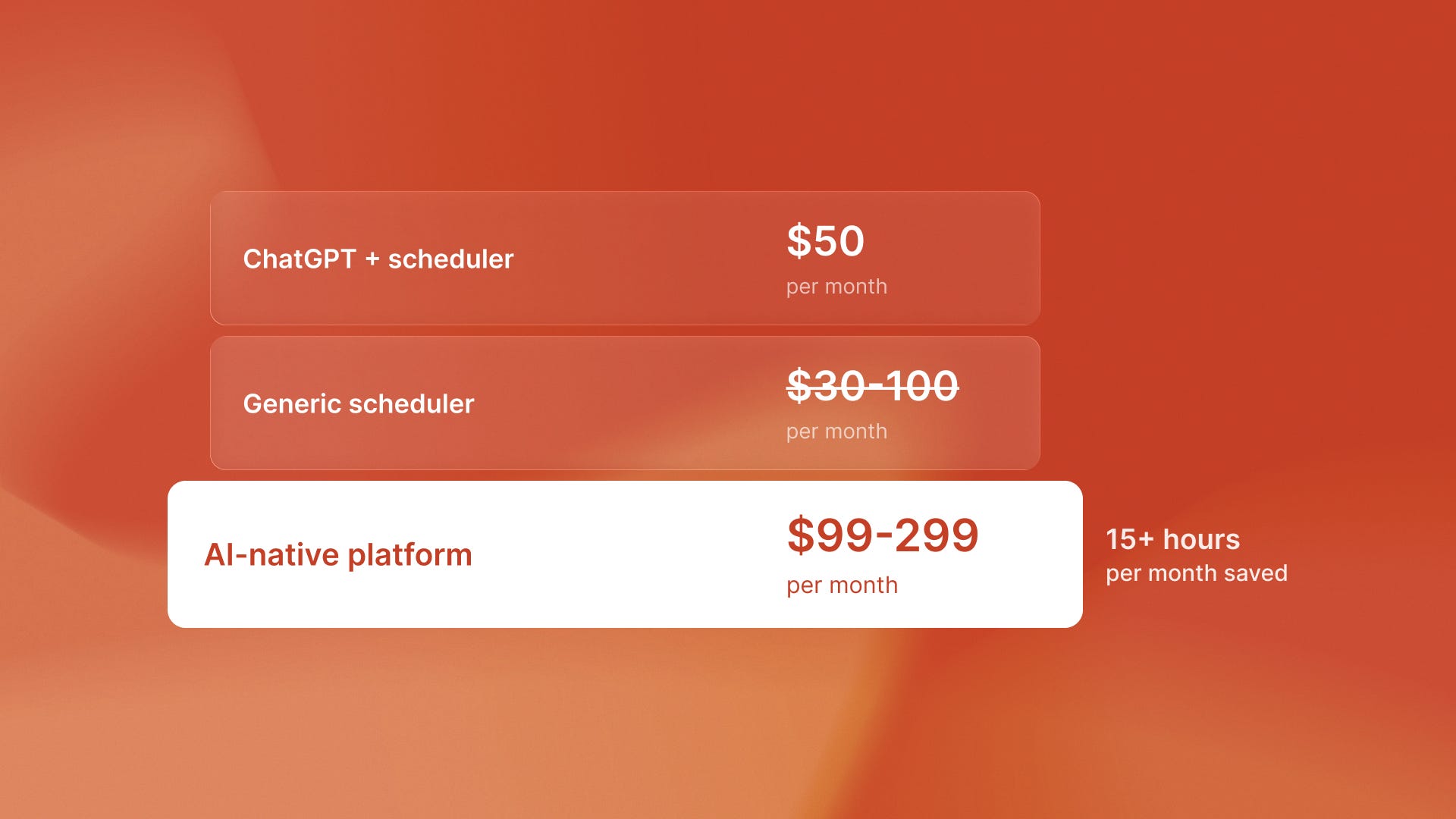
The cost comparison matters. Agency-level content creation costs $5-10k monthly. LinkedIn AI content tools 2026 start around $99/month. That’s a 50-98% reduction while maintaining personalization quality generic tools can’t match.
Small businesses leveraging AI tools for content automation often see the same pattern in their operations. Integrated systems work better than manual tool mixes, even if each tool is strong.
Should I use a generic scheduler or LinkedIn-specific tool?
The decision comes down to three factors: platform focus, posting frequency, and personalization requirements.
Generic schedulers make sense when LinkedIn is one channel among many. If you’re managing Instagram, Twitter, and Facebook simultaneously, the unified dashboard creates real value. Your team needs one place to coordinate cross-platform campaigns.
LinkedIn-specific tools make sense when LinkedIn is your primary channel for thought leadership and lead generation. If you post three or more times a week on LinkedIn, LinkedIn mechanics matter more than cross-platform ease.
The architectural difference matters. Autonomous systems that generate outputs from business data scale differently than automation that executes predefined steps faster. The same distinction separates AI-native LinkedIn platforms from schedulers that automate manual workflows.
When each approach makes sense
Tool choice depends on three variables: posting frequency, personalization needs, and budget.
Use ChatGPT + scheduler if:
You’re posting 1-2 times weekly
You have time for 15-20 minutes of manual work per post
Your content doesn’t require deep business context integration
You’re comfortable editing AI outputs extensively
Budget is under $50/month total
Use generic schedulers if:
You’re managing multiple social platforms simultaneously
Your team needs a unified dashboard for cross-platform campaigns
LinkedIn is one channel among several, not your primary focus
You already have content creation workflows that work
You need multi-user team collaboration features
Use AI-native LinkedIn platforms if:
You’re posting 3+ times weekly and struggling with consistency
You want personalization that pulls from real business data
You’re building thought leadership as a primary growth strategy
You don’t have time for extensive manual editing per post
The 15+ hours monthly saved justifies $99-299/month cost
LinkedIn newsletter subscriber growth is 150% year-over-year, making newsletters the fastest-growing content format. Maintaining that consistency requires more than willpower. It requires infrastructure that removes friction.
The same cost-calculation principles that reveal hidden freelancer overhead also apply to LinkedIn tools. A tool that seems cheaper often costs more in operational overhead. Real-time visibility into what workflows actually cost enables better decisions.
The operational reality of tool selection
The comparison isn’t really about features. It’s about what you’ll actually sustain. ChatGPT workflows work until the manual overhead becomes too much. Generic schedulers work until you realize LinkedIn-specific mechanics matter. AI-native LinkedIn platforms work when integrated automation justifies the cost.
Personalization quality compounds over time. Generic posts don’t build authority. Context-rich posts that reflect real business insights do. The tool that maintains higher quality output while reducing operational overhead wins on a long enough timeline.
Teams that adopt AI tools without redesigning workflows discover the hidden costs later. The same principle applies here: the tool’s listed price matters less than the overhead it adds or removes.
The question isn’t which tool has the most impressive demo. It’s which workflow removes enough friction that you actually post consistently for six months. That consistency determines whether LinkedIn becomes a lead generation channel or another abandoned social media graveyard.
What to do next
Audit your current workflow overhead. Track how much time you spend copying, pasting, formatting, and context-switching per post. If it’s over 15 minutes, you’re paying more in operational cost than most tools charge.
Calculate your posting frequency goal versus reality. If you want to post 3x weekly but actually post 1x weekly, the gap is likely friction, not discipline. The right tool eliminates that gap.
Test one integrated workflow for 30 days. Pick the tool category that matches your use case and commit to consistent execution. Measure time saved and quality maintained, not feature lists.
Compare your results to baseline. If you’re spending less time per post and posting more consistently, the tool is working. If you’re still copying and pasting between systems, try a different approach.
Consistency beats virality. The right tool is the one that removes enough friction that you actually post. Ready to eliminate the copy-paste overhead? Start free and see how integrated LinkedIn automation changes your posting consistency.